Windows 10 / 11 · Free · Open source

See where your disk space went. Clean with confidence.

SysOptimizer is an open-source Windows cleaner and system insight tool built with Rust: 9 feature modules, 66 cleaning rules covering 56 popular apps, a ~1.5 MB installer — everything runs locally, nothing is ever uploaded.

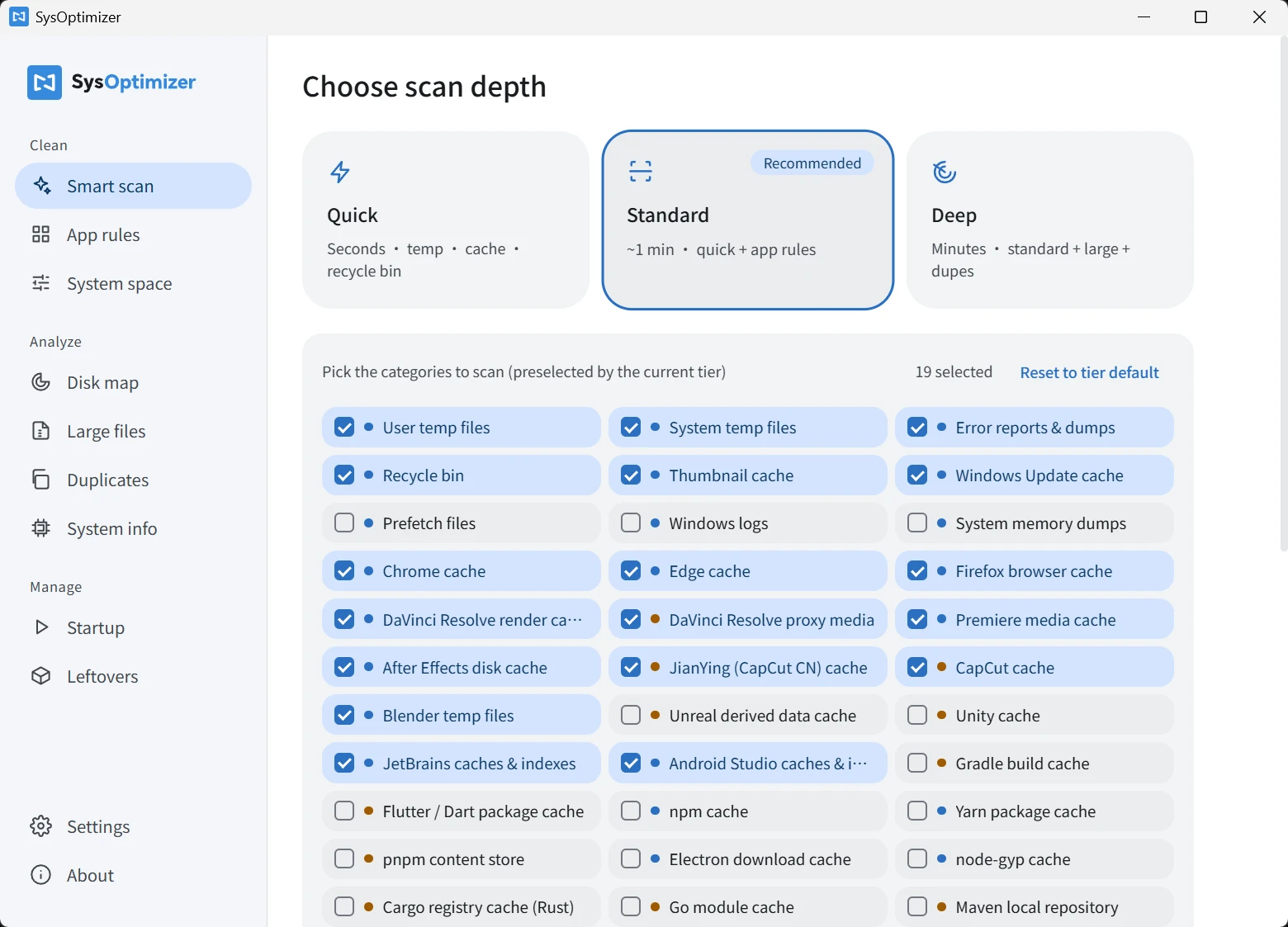
SysOptimizer main window: choosing scan depth and cleanup categories
≈1.5 MB
installer size
9
feature modules
66
cleaning rules · 56 apps
0
data uploaded — 100% local

Understand the risk labels before you clean

Everything cleanable carries a color — the single most important convention in the app.

Risk-free cache

Pre-selected

Rebuilt automatically by the system or app — you'll barely notice. Clean with confidence.

Slow to rebuild

Unchecked by default

No data is lost, but regenerating may be slow or require re-downloading. Confirm before cleaning.

Report only

Never deleted

This is your content — size is shown, but there isn't even a delete button.

Paired with cautious delete mode (on by default): amber slow-to-rebuild items go to the Recycle Bin first, so you can always change your mind.

Features

Three scan tiers

Quick, Standard and Deep: from instant temp-file cleanup to full-disk insight covering large and duplicate files.

Three-level risk labels

Blue caches are safe and pre-selected; amber items that are slow to rebuild stay unchecked with inline warnings; your own content is reported only — never deleted.

App-specific cleaning

56 apps and 66 cleaning rules built in: DaVinci Resolve, Premiere, CapCut, Blender, Unreal, JetBrains, VS Code, npm, Steam, WeChat and more — with new rules added continuously.

File-level preview

Preview every file before cleaning, sorted by size. Deselect anything you want to keep; files in use are skipped automatically.

Smart path resolution

Detects custom cache locations automatically (e.g. DaVinci proxy folders). If detection fails you can point to the path yourself — nothing gets missed.

Local-first, privacy-respecting

Scanning and cleaning happen entirely on your machine, with a local action log you can inspect anytime. No file information ever leaves your PC.

The full manual

For every module we spell out three things: what it does, what it deliberately never touches, and what happens afterwards. Here are all nine.

01

Smart scan

One-click cache & temp cleanup, three depths to choose from

  • Quick (seconds): user & system temp files, Chrome / Edge / Firefox caches, error reports & crash dumps, recycle bin.
  • Standard (~1 min, recommended): everything in Quick + thumbnail cache, Windows Update cache, caches of installed pro apps.
  • Deep (minutes): everything in Standard + Prefetch, Windows logs & memory dumps, package-manager and build caches (npm / Gradle / Cargo / Go / Maven and more).
  • Custom scope: pick categories one by one, preselected by the current tier.
  • Caches only — bookmarks, passwords, history and cookie logins are never touched. You won't be signed out.
  • Files in use are skipped automatically and counted; there's always one more confirmation before cleaning.
02

App-specific cleaning

Knows the cache locations of 56 apps — more precise than generic cleaners

  • 66 built-in rules covering 56 apps across 9 groups: video editing, 3D & game engines, developer tools, game launchers, office & communication and more.
  • Grouped by app, with automatic install detection — apps you don't have stay out of the way.
  • Three-level path resolution: manual override > auto detection > default. Custom cache folders (e.g. DaVinci Resolve) are detected from the app's own config.
  • When a target scans as 0, an inline “Set path” hint appears — moving a cache to another drive won't hide it.
  • Manually specified paths pointing at system folders or drive roots are rejected outright.
03

Disk map

Answers “I did nothing — why is my disk full?”

  • Draws disk usage layer by layer, TreeSize-style: treemap and list views, click to drill down.
  • Live results while scanning — no waiting on large disks.
  • View-only: deletes nothing. Found the culprit? “Open location” takes you straight there.
  • Also lists known locations you can see but shouldn't auto-delete — Windows Installer, Office install cache, font cache, search index — and explains why.
04

Large files

Find space hogs — deletions always go to the Recycle Bin

  • Thresholds of 50 MB / 100 MB / 500 MB / 1 GB, results sorted by size.
  • Large files are your files, not junk — so deletion always means the Recycle Bin, restorable anytime.
  • System folders (Windows, Program Files…) are never scanned; even manually targeted system files are refused (double protection).
05

Duplicate files

Byte-for-byte verified duplicates; one copy per group is always kept

  • Three-stage detection: size comparison first, then fast head/tail sampling, then a full-content check — only true byte-identical files are flagged. No false positives.
  • One file per group is kept by default; you choose which one.
  • The UI makes it impossible to delete every copy in a group — at least one always survives. Hard rule.
  • Deletions go to the Recycle Bin, restorable.
06

Startup

Disable only, never delete — always reversible

  • Aggregates three sources: registry Run keys (current user + all users), the Startup folder, and scheduled tasks.
  • Toggling off means disabled, not deleted — same as Windows Task Manager. The original entry stays intact and can be re-enabled anytime.
07

Uninstall leftovers

Heuristic discovery, report-only — there isn't even a delete button

  • Cross-checks the installed-programs list against Program Files and AppData to surface folders that match nothing.
  • This kind of guess can be wrong — a portable app you still use might look like a leftover. So we only report, with a confidence label, and provide no delete function at all.
  • “Open location” hands it over to you. Whether and how to delete is entirely your call.
08

System space

Hibernation file, restore points, Windows.old, WinSxS — reclaimed via official Microsoft tools

  • The hibernation file is typically 40–75% of your RAM (6–12 GB on a 16 GB machine); Windows.old often holds 10–30 GB.
  • Every operation calls official Windows tools (powercfg / DISM / vssadmin) — no brute-force file deletion.
  • The riskiest module, so everything is off by default: each item states its cost, asks for confirmation again, and items already in the target state are greyed out.
09

System info

Your hardware at a glance — RAM slots front and center

  • CPU, motherboard / BIOS, GPU, drives, displays, laptop battery health (full-charge vs design capacity).
  • RAM slots are the highlight: total slots, used, free, plus each module's capacity, speed, generation (DDR4/DDR5), brand and model — planning an upgrade takes one glance.
  • Copy the whole report with one click to share with IT or a friend.
  • Deliberately loads no kernel driver, so no temperatures / fan speeds / voltages — kernel drivers carry security and stability risks a daily tool shouldn't take.

Supported apps, listed one by one

This list is generated straight from the app's built-in rule library, so it matches actual behavior exactly. Every target carries a risk label — blue cleans safely, amber deserves a second thought, grey is reported only and never deleted.

Cache — safe to cleanCostly to rebuild — confirm before cleaningReport only — never deleted

Video editing

DaVinci ResolveDaVinci Resolve render cacheDaVinci ResolveDaVinci Resolve proxy mediaAdobe Premiere ProPremiere media cacheAdobe After EffectsAfter Effects disk cache剪映专业版JianYing (CapCut CN) cacheCapCutCapCut cache

3D & game engines

BlenderBlender temp filesUnreal EngineUnreal derived data cacheUnityUnity cache

Browsers

Google ChromeChrome cacheMicrosoft EdgeEdge cacheMozilla FirefoxFirefox browser cache

Developer tools

JetBrains IDEsJetBrains caches & indexesAndroid StudioAndroid Studio caches & indexesGradleGradle build cacheFlutter / DartFlutter / Dart package cachenpmnpm cacheYarnYarn package cachepnpmpnpm content storeElectronElectron download cachenode-gypnode-gyp cacheRust / CargoCargo registry cache (Rust)GoGo module cacheMavenMaven local repositoryNuGetNuGet global packagesComposerComposer cache (PHP)pip (Python)pip cache (Python)Visual Studio CodeVS Code cache & workspace storageConda / MinicondaConda package cacheAndroid Emulator / SDKAndroid Emulator / SDK cacheDocker DesktopDocker data

Creative & media

SpotifySpotify offline cacheAdobe PhotoshopPhotoshop Camera Raw cacheAdobe Creative CloudAdobe crash dumps & logsFigmaFigma desktop cache抖音Douyin files & cachePotPlayerPotPlayerVLCVLCQQ 音乐QQ Music网易云音乐NetEase Cloud Music

Game platforms

Epic Games LauncherEpic Launcher web cacheBattle.netBattle.net cacheSteamSteam download & shader cacheUbisoft ConnectUbisoft Connect cache

Office & productivity

WPS OfficeWPS Office cacheNotionNotion desktop cacheObsidianObsidian cache

Tools & others

搜狗输入法Sogou Input百度网盘Baidu Netdisk迅雷Xunlei / ThunderIDM 下载器IDM

Communication

ZoomZoom recordingsMicrosoft TeamsMicrosoft Teams cacheSlackSlack cacheDiscordDiscord cacheWeChat 微信WeChat files & cacheQQ / TencentQQ / Tencent files

WeChat / QQ / cloud drives / media players mix your files with their caches in the same folders, so caches can't be picked out automatically and safely. To avoid deleting your files, these are report-only: size shown, location openable, deletion left to you.

The details are taken care of

A tool that deletes files deserves to be built with maximum caution. These safeguards live in the code:

Dangerous-path safety gate

The cleaning engine refuses to recursively clean any path that resolves to a drive root, Windows / Program Files, personal folders like Desktop or Documents, or the AppData root — even if a rule or manual override points there. Enforced on both frontend and backend.

Cautious delete mode (on by default)

Amber slow-to-rebuild items go to the Recycle Bin first, giving you a way back; only risk-free caches are deleted directly. Toggle it anytime in Settings.

In-use and running-app detection

Locked files are skipped and counted; if the target app is running, an inline note asks you to close it first so its open pages don't break.

Symlinks never followed

Neither scanning nor cleaning follows symbolic links or shortcuts — link targets are never deleted by mistake, and sizes are never double-counted.

File-level preview & deselect

Preview every file before cleaning, sorted by size, and deselect anything you want to keep. Every cleanup ends with an explicit confirmation dialog.

Inline risk notes

“Recycle bin — cannot be undone”, “DaVinci proxies — regenerating may take hours”, “Go module cache is read-only” — every warning appears exactly on the row where it matters.

Local action log

Every cleanup is written to a local log, one click away in Settings; the About page tracks total space freed and cleanup count.

Verifiable downloads

The download page publishes a SHA-256 checksum for every installer, so you can verify integrity yourself.
Things we deliberately don't do

Restraint is harder than aggression. For your peace of mind, here is what this tool will never do:

  • Never deletes your personal files — documents, photos, videos, projects. Cache cleaning never enters those areas.
  • Never touches browser bookmarks, passwords, history or cookie logins — you won't be signed out after cleaning.
  • Never deletes your content — files received in WeChat / QQ, Zoom recordings, Docker images, offline music are reported only; there isn't even a delete button.
  • Never cleans C:\Windows\Installer — the “space-saving trick” you may have read about is a dangerous myth that breaks uninstall, repair and updates.
  • No registry “optimization” or “cleaning” — minimal benefit, non-trivial risk; the industry has long advised against it.
  • No kernel drivers — so no temperature readouts, but also no antivirus alarms and no blue-screen risk.
  • Never connects or uploads anything — scanning, cleaning and logs all stay on your machine.

Built with Rust. Open source, auditable.

Trust comes from the tech stack and from public code.

Rust + Tauri 2

The scan and cleanup engine is written in Rust — native performance, memory safety. The UI runs on the system's built-in WebView2; no bundled browser engine.

≈1.5 MB installer

A fraction of the size of comparable Electron tools. Fast to download, fast to install — a cleaner that starts by being light itself.

Open source (GPL-3.0)

The code is fully public under GPL-3.0 — every cleaning rule and every safety gate can be audited. The About page lists all open-source component licenses.

View the source on GitHub →

Bilingual

Chinese and English in both the app and this site, following your system language by default, switchable anytime.

By Xinshang Technology

Developed by Shenyang Xinshang Technology, technical support by Deconstructor. The rule library keeps growing — supporting a new app takes one rule entry.

FAQ

Windows says “Windows protected your PC” on first run?

That's because the tool ships without a paid code-signing certificate — it is not a virus. Click “More info → Run anyway”. If in doubt, verify the SHA-256 checksum published on the download page.

Why does it ask for administrator rights?

Cleaning system temp files, the Windows Update cache, and reclaiming system-level space all require elevation. The app requests it once at startup (a single UAC prompt) so every feature works.

Can I undo a cleanup?

Caches rebuild automatically, so nothing to undo. Large files, duplicates and amber items (in cautious mode) go to the Recycle Bin and can be restored. Emptying the recycle bin and system-level space are irreversible — the UI marks these clearly.

Does it upload my data?

No. Nothing is collected or uploaded — no accounts, no analytics. All scanning and cleaning happen on your machine, and logs stay local too.

Could it delete my documents or photos?

No. Cache cleaning only enters explicit cache/temp folders, and the engine's safety gate rejects any rule or manual path that points at personal folders. Large-file and duplicate scans do look at your folders, but you tick every file yourself and deletions go to the Recycle Bin.

Does it support Windows 7?

No. Windows 10 (1809+) and Windows 11 only, 64-bit.

Give your disk a fresh start

Free download, ~1.5 MB installer, ready in seconds. Chinese and English included.

Download for free